How to Leverage Your Colleagues' Networks for Intros
Everyone on your team carries a network you can't see. As long as you're connected to your colleagues on LinkedIn, Draftboard maps their networks and shows you which of your targets they can introduce you to.
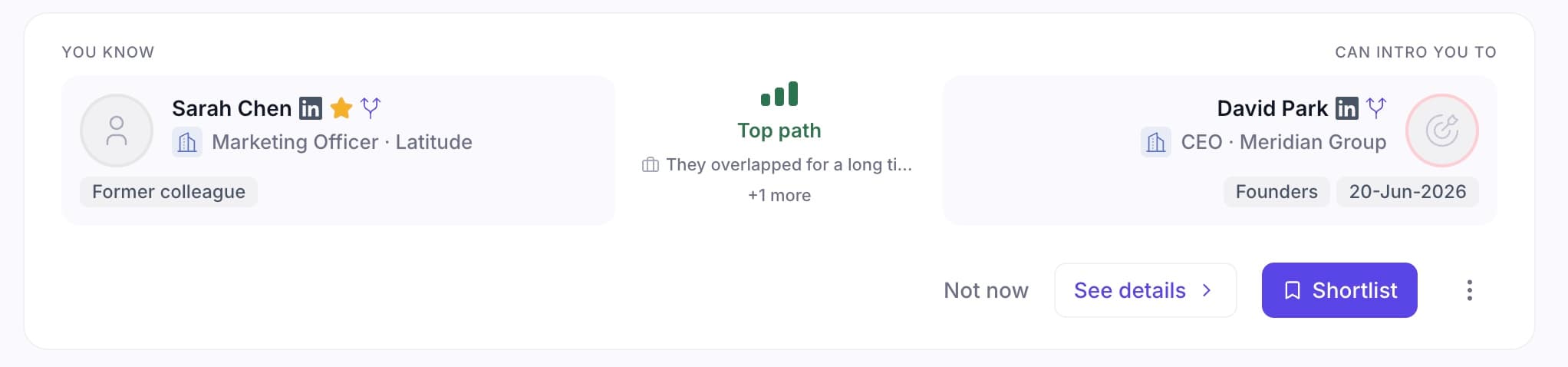
What a warm path looks like in Draftboard: the connector, a 0-100 relationship score, why it's strong, and a one-click intro request.
Step by step
- 1
Add your target accounts or people
Paste LinkedIn URLs or upload a CSV of the accounts and people you want to reach.
- 2
Make sure you're connected to your colleagues
You just need to be 1st-degree LinkedIn connections. Your colleagues don't have to sign up, install anything, or upload anything.
- 3
Let Draftboard map their networks
Draftboard maps your colleagues' connections and finds the ones who can reach each of your targets.
- 4
Review the ranked paths
Each path is scored 0-100 on shared history, mutual connections, seniority, and recency, so you know which asks are worth it.
- 5
Hand the right colleague a ready-to-send ask
Give them a pre-drafted, forwardable intro request for the few that matter, so it takes them 30 seconds.
- 6
Going further: unlock their 2nd-degree networks
Want even more reach? Invite your colleagues as team members so Draftboard maps their full networks, then you can find and request intros through the people their connections know, too.
What you'll have at the end
A prioritized list of intros your colleagues can actually make, without anyone digging through LinkedIn.
Try it on your own list
Warm intros convert around 30-40% where cold outreach lands under 1%. Add your targets and see the warm paths you already have. Free to start, no credit card.